My Drives

My Drives
License:
Free
Language:
English
Developer:
OS:
Win2000/XP/2003/Vista
Added:
See detailed info

Softonic review

Nick Mead

“Change the icons for all your drives”

by Nick Mead about My Drives

Most of the icons Windows uses for drives are very boring and generic. The only thing that changes is the letter which is why I like My Drives because it allows you to assign a different icon to each one whether its your internal hard drive or an external drive.

What I like about this is it's much easier to differentiate between drives rather than have to remember a letter. I have so many attached to my PC that it's sometimes difficult to remember what contains what but I somehow find it much easier with different icons.

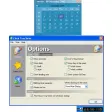
The program comes preinstalled with several different options for logos such as a cellphone, a pendrive, video camera, photo, logo, Windows partition, and so on.

However, it's a shame it doesn't come with a lot more because drives can be used to store much more than these - the most obvious being documents - but it doesn't cater for all.

On the plus side, it's easy to install and assign icons to your drives. The most annoying thing however is that once you click "Apply Changes" the computer is restarted.

This is because Windows can't handle changing the image whilst Windows is operating - even Vista.

My Drives is a clever little program that gives you more control over your drive icons but it's s ahem about all the annoying restarts.

Pros
  • Allows you to identify drives more easily
Cons
  • Requires restart after changes
Free Download My Drives 1.4

My Drives is virus free

We have analyzed the latest version of My Drives with 30 antivirus engines and it is virus free. See analysis results.

TESTED VIRUS FREE - Softonic GUARANTEED

Developer's description

Ever wanted to change the look of your drive icons? My Drives allows you to customize the look of drives in Windows Explorer. My Drives customizes the look of disk drives in Windows Explorer by replacing drive icons, setting labels and hiding drives.

Review and rate My Drives

Your avatar

Your opinion is important.
Help other users - be the first to review this program.

Review
  1. Maximum: 75 characters

  2. See example

Pros and Cons
Rate
  1. What rating would you give My Drives?

    You need to fill in all fields

    • Usability:

      Not rated
    • Stability:

      Not rated
    • Installation:

      Not rated
    • Functionality:

      Not rated
    • Appearance:

      Not rated
    • Overall rating:

      Not rated
  2. Don't worry, we won't make your email address public.

You're not allowed to share serial numbers, cracks, etc. or link to pages that contain them. If you do, your user account will be deleted, your IP address logged and legal action will be taken.

Get started - just ask a question!

Write a title for your question.

Alternativesto My Drives

  • In English:
    Axialis Object Pack
    Axialis Object Pack

    150 objects to help you create your own great icons

    Softonic rating:
    • 8/10
    User rating:
    • 7/10
  • Better rating:
    Vista High PX Icons
    Vista High PX Icons

    Pack of 150 icons inspired by Windows Vista

    Softonic rating:
    • 8/10
    User rating:
    • 9/10
Compare with My Drives
Download rank: General

4 of 8

Softonic rating:
  • Good
  • 7/10
User rating: (7 ratings)
  • Very good
  • 9/10
Your rating:
Your rating
  • 0

Review and rate this program

Top Downloads: General

  • United States
  • Global

  1. How much is your PC mouse used every day?

Reviews of My Drives in other languages